SEO
Introduction
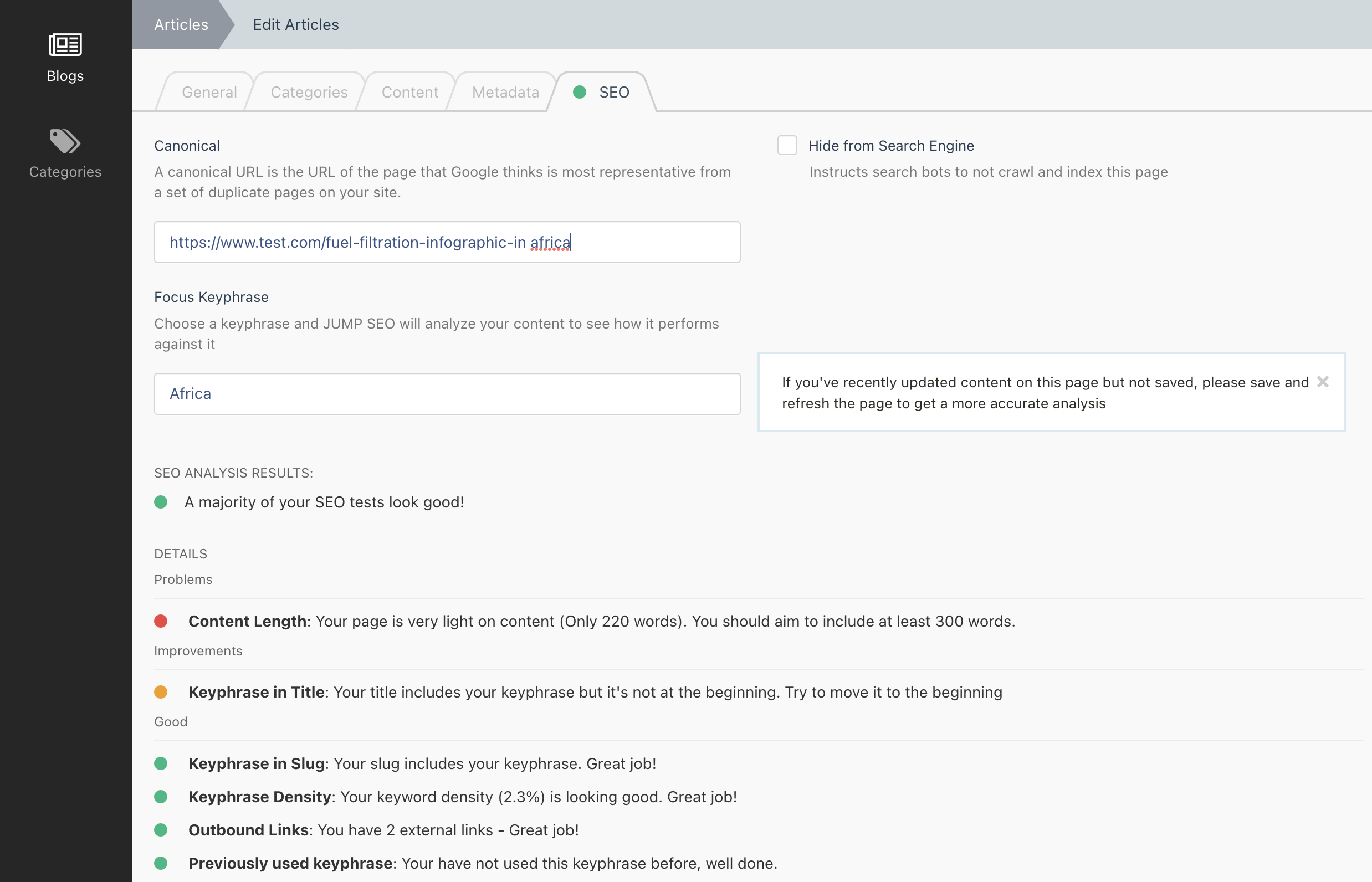
The SEO functionality provided by the Metadata Plugin is based upon the Yoast SEO Plugin for WordPress.
It is designed to scan page content for a number of factors and give the user a RAG (Red, Amber, Green) rating.
As of v3.19.0 of the JUMP Pages Plugin, Static Pages are integrated with this new SEO functionality. You therefore will need to add the new tags to your pagesections yaml files otherwise your Pages will rank poorly as the Plugin will not know what is content or hyperlinks!
The SEO section also provides the following features:
Canonical URL
A canonical URL is the URL of the page that Google thinks is most representative from a set of duplicate pages on your site.
Example Usage
<link rel="canonical" href="{{ url(this.page.meta_canonical ?: getCanonicalLink()) }}" />
Hide From Search Engine
Instructs search bots to not crawl and index this page
Example Usage
{% if this.page.meta_prevent_crawling %}
    <meta name="robots" content="noindex">
{% endif %}
Integrating SEO
Similar to the Metadata functionality, the SEO functionality has an Seoable Trait and an Seoable Interface.
Add Code to your Model
Add the Trait, Interface and the required methods to the Model you wish to display the SEO panel on in the backend form
Required Methods
/**
 * Fetch the HTML Title of this entity. Try to use whatever gets used
 * as the HTML Page Title
 *
 * @return string
 */
public function getTitleForSeo(): string;


/**
 * Fetch the slug for this entity
 *
 * @return string
 */
public function getSlugForSeo(): string;


/**
 * Fetch the entire content for this entity.
 * If you use JUMP Page PageSections as the entities main content, then loop
 * over all Text-type PageSections and concatenate into 1 string.
 *
 * If you have multiple fields that make up the entities Page content, then
 * please concatenate them all together
 * There are helper methods available for this in Jump\Metadata\Classes\Seo\SeoHelpers
 *
 * @return string
 */
public function getContentForSeo(): string;

/**
 * An array of all hyperlinks (internal and outgoing) that could be rendered
 * on this entities Page
 *
 * If you use JUMP Page PageSections as the entities content, then loop
 * over all PageSections that could contain links and fetch their URLS
 *
 * If your Model has fields for hyperlinks that get rendered on the page
 * then include those too
 * There are helper methods available for this in Jump\Metadata\Classes\Seo\SeoHelpers
 *
 * @return array
 */
public function getHyperlinksForSeo(): array;
Example
<?php

namespace App\Blog\Models;

use Jump\Metadata\Classes\Seoable;
use Jump\Metadata\Traits\Seoable as SeoableTrait;

class Article extends Model implements Seoable
{
    use SeoableTrait;

    ...
    /**
     * @inheritDoc
     */
    public function getTitleForSeo(): string
    {
        if ($this->metadata->title) {
            return $this->metadata->title;
        }

        return $this->title;
    }

    /**
     * @inheritDoc
     */
    public function getSlugForSeo(): string
    {
        return $this->slug;
    }

    /**
     * @inheritDoc
     */
    public function getHyperlinksForSeo(): array
    {
        // In this example, $this->content is a $jsonable column containing JUMP Page Pagesections

        return SeoHelpers::getHyperlinksFromPageSections($this->content);
    }


    /**
     * @inheritDoc
     */
    public function getContentForSeo(): string
    {
        // In this example, $this->content is a $jsonable column containing JUMP Page Pagesections
        // and $this->introduction is a text column using an October textarea type

        $pageSectionData = SeoHelpers::getContentFromPageSections($this->content);
        $introData = $this->introduction;

        return $pageSectionData . ' ' . $introData;
    }
    ...
Add new tags to PageSection YAML files
To ensure the SEO plugin can detect text content and link content inside your Pagesections, there are 2 new fields you can add to your .yaml files inside your PageSections fields or the Blocks within a Pagesection:
seoContent: true
seoLinks: true
If you are using a simple field type such as text or textarea and expect the user to add basic text that gets rendered on the frontend, then simply add the seoContent: true tag and the entire content of the field will be treated as content.
If you are using a simple field type such as text and expect the user to add a link (such as a Call To Action link) then just add seoLinks: true tag and the entire content of the field will be treated as a URL.
If both tags are present on a field, then it is treated as HTML and Links will be detected by scanning for anchor tags. Use this for the richeditor field type if you add the Links to the toolbarButtons value.
fields:

    title:
        label: Title
        type: text
        comment: Renders a title as a h2 tag
        seoContent: true

    callToActionLabel:
        label: Call to Action Label
        type: text
        comment: Renders a button on the frontend. This will be the label
        seoContent: true

    callToActionLink
        label: Call to Action URL
        type: text
        comment: Renders a button on the frontend. This will be the url
        seoLinks: true

    text:
        label: Text Content
        type: richeditor
        comment: Renders HTML raw
        seoContent: true
        seoLinks: true